









Rippling + eCardWidget
Rippling sends a daily employee report to eCardWidget by SFTP. New hires land in your Directory, leavers are switched off, and birthdays and work anniversaries send themselves.
Your Rippling data keeps the Directory current
Rippling drops a fresh employee export on a schedule, and eCardWidget imports it into your team Directory. Nobody keeps a second list by hand.
- New hires are added, so your welcome, birthday and anniversary automations pick them up.
- People who left are deactivated, never deleted, so cards stop going to them and their card history stays.
- Birthdays and start dates come across, and those dates drive your automations.
- Managers and groups come across too, so the right team is invited to sign a Group Card.
How to connect Rippling and eCardWidget
- 1In Rippling Workflow Studio, create a workflow on a daily schedule that sends your employee report by SFTP.
- 2Enter the connection details from the HR System Feed page in eCardWidget, with a password or an SSH key.
- 3Run the test step in Rippling once, then match the columns. After that the report arrives every day on its own.
Each run is logged, and you get an email if an import fails or a file stops arriving. The HR System Feed is on the Enterprise plan. How the HR System Feed works · Setup guide
Set the automations once, and Rippling keeps them pointed at the right people
Each card goes out at your chosen send time in that person's own time zone.
Work anniversaries from the start date
The hire date in Rippling becomes the anniversary card, with their years of service in the message. On Enterprise, the card can carry a gift card too. Automations
Birthday Group Cards the team signs
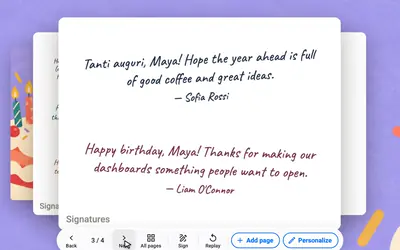
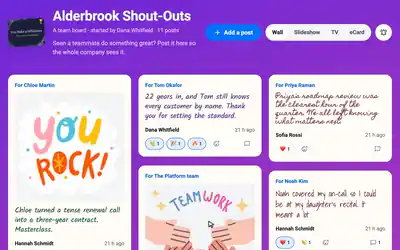
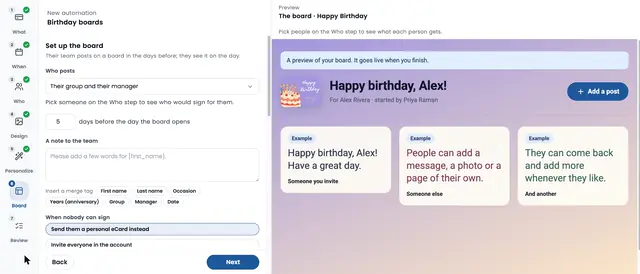
A birthday or anniversary automation can send a Group Card. Their group and manager are invited to sign ahead of the day, and the card goes out on the day. Group Cards
Not on Enterprise yet? Start with a spreadsheet
CSV import
Export your team from Rippling and import the spreadsheet into the Directory. Works on every plan.
Zapier
If you already run Rippling workflows through Zapier, a Zap can create or update team members in eCardWidget. Zapier
Rippling + eCardWidget questions
Is there an app to install in Rippling?
eCardWidget reads the employee export Rippling already produces, so there's nothing to install in Rippling. Once the export is scheduled, it runs without anyone on your team touching it.
What happens when someone leaves?
When a person drops off the Rippling export, eCardWidget deactivates them instead of deleting them. Automations stop sending to them, and the cards they sent and received stay on record. If a file would switch off an unusual share of the team at once, the import stops and waits for you, so a bad export can't empty your Directory.
Do we need SSO or SCIM for this?
No. The HR System Feed works on its own, so you can keep your Directory current from Rippling without setting up an identity provider. SSO and SCIM are there if you want them too.
Which plan includes the HR System Feed?
The HR System Feed is on the Enterprise plan. CSV import of your team works on every plan, so you can start with a spreadsheet and move to the feed later.
Related integrations
Browse all HR & HRIS integrations →
BambooHR
Upload your BambooHR employee report to keep the eCardWidget Directory current.

Workday
A scheduled Workday export by SFTP keeps your eCardWidget Directory current.

Gusto
Upload your Gusto team export to keep the eCardWidget Directory current.

ADP Workforce Now
A recurring ADP export by SFTP keeps your eCardWidget Directory current.
See the HR System Feed with your Rippling export
Book a demo to see your team flow from Rippling into birthday and anniversary cards. Or start free with a CSV import today.