








Corporate Christmas Cards Clients and Teams Actually Open
Branded corporate Christmas cards for clients, employees and partners, sent in minutes instead of mailed weeks ahead. Add a gift card they choose, and it arrives inside the card on the same day.
Why digital wins for business
Arrive on time, every time: no postal delays, no address list cleanup, no missed deadlines.
Scale is easy: sending to 5,000 takes the same effort as sending to 50. Printed cards cost more with every one you add.
Your brand travels: logo, colors, domain, sender address all baked in. Printed cards are generic templates.
Personalization at scale: "Happy Holidays, [First Name]" on 500 cards takes zero extra effort.
Easy to track engagement: see who opened, replied, forwarded. Printed cards are black-box.
Environmentally friendlier: no paper, no postal carbon. Matters for ESG-conscious buyers and nonprofits.
What makes a good one
Branded: your logo, company colors, and domain visible. Without this, it looks like a stock mass email.
Personalized: recipient first name in the message body, not just the To: field.
Readable on mobile: plenty of clients open email on their phone, and a desktop-only card loses them.
Short message, specific subject: "Season's greetings from [Company]" beats "Happy Holidays!" in open rates.
A real sender: a person's name (account manager), not a noreply@ address. Drives replies.
Reply-able: the point of the card is relationship maintenance. Replies are how that happens.
Skip the copy-paste. Send a branded eCard in 60 seconds.
Your company logo, your colors, your message. Automated or one-off.
10-minute sending workflow
-
1
Upload or sync your recipient list (CSV, CRM, or Google contacts).
-
2
Pick or customize a branded template with your logo, colors and company imagery.
-
3
Write a short message (2-3 sentences). Use merge fields for recipient first name.
-
4
Schedule the send (Dec 15-22 is the sweet spot, weekday, 10am recipient time zone).
-
5
Review engagement reports after the send. Reply to incoming replies.
Types of corporate Christmas cards
Client appreciation cards: thank-you themed, sent to the full client list.
Internal team cards: from leadership to employees, with a gift card inside if you want one. See holiday corporate gifts for the full setup.
Vendor/partner cards: a small thank-you to the people behind the scenes.
Nonprofit donor thank-you cards: pair with year-end appeal or standalone gratitude.
Charity-themed donation cards: "in lieu of a traditional card, we made a donation to [cause]."
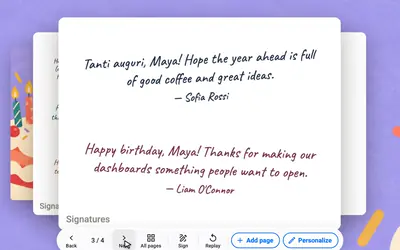
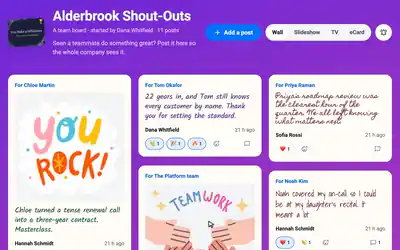
Team-signed cards: one Group Card the whole account team signs with messages, photos and GIFs, for a top client or a manager.
A card they keep, with a gift they choose
Add a digital gift card to the Christmas send. Pick one brand for everyone, or let each client or employee choose from every brand at the amount you set. They click Claim Gift Card on the eCard, enter the code sent to their email, and redeem it.
- ✓ Fund it through Giftbit or upload codes you already bought
- ✓ Spend limits by hour, day and month, and approval over an amount
- ✓ Every order and claim in the audit log, with CSV export
Gift cards are on the Enterprise plan. More on gift cards for employees.
Signed by the whole team
For your biggest clients, send a Group Card. Everyone who works on the account adds a message, a photo or a GIF before the card goes out, and the team can chip in toward a gift.
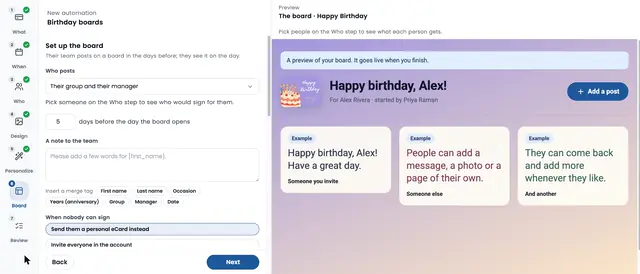
For the rest of the list, a holiday automation sends each person their own card on the day, every year. Group Cards · Automations
Common mistakes to avoid
Sending too early: cards arriving Dec 1 feel premature and get archived.
Using a noreply sender: kills replies and engagement.
Generic "Happy Holidays" subject: blends in with 200 other holiday emails.
No recipient name in the message: instant signal it's a mass send; engagement drops.
Over-designed cards: fancy animations kill load times and look broken in corporate email.
Sales pitch in the card: turns a relationship gesture into a marketing email.
Browse Matching eCard Templates
Pair any message above with a branded, ready-to-send eCard template.
Frequently Asked Questions
Are digital Christmas cards professional enough for business use?
How much do digital business Christmas cards cost?
Can digital Christmas cards be sent to international recipients?
Do digital Christmas cards get opened more or less than printed?
Can I include a gift card or discount with a digital Christmas card?
What's the best list size to switch to digital cards?
What's the difference between corporate Christmas cards and corporate holiday cards?
Can I personalize corporate Christmas cards for each client?
Start sending branded eCards
Join 9,000+ organizations using eCardWidget to send branded eCards that actually get read.