








HR System Feed
HRIS Integration: Your HR System Keeps Recognition Current
Your HR system sends its employee report to eCardWidget by SFTP on a schedule. New hires are added, people who left are switched off, and birthday and work anniversary cards keep going to the right people without anyone touching a spreadsheet.
Enterprise plan · ADP, Workday, UKG Pro, Paycor, Paylocity, Rippling and more · No SSO or SCIM needed
How it works
Set it up once. Every file after that updates the Directory.
Most HR systems can already schedule a report to an SFTP server. eCardWidget gives your account its own private SFTP drop, so the export your HR team runs today becomes the source of truth for recognition.
Pick your HR system
Choose it on the HR System Feed page in eCardWidget and you get setup steps written for that system, plus the connection details to give it.
Schedule the report
Your HR system, or its support team, schedules the employee report for SFTP delivery. Nothing gets installed in your HR system.
Match the columns once
eCardWidget suggests which column is the email, the name, the birthday and the hire date, and you confirm. From then on, the newest file always wins.
What each file does
Joiners, changes and leavers, straight from HR
- New hires are added, so their welcome, birthday and anniversary cards are covered from their first week.
- Changes come across: new title, new manager, new department. Group Card invites go to the right team.
- People who left are deactivated, never deleted, so no card goes to someone who's gone, and the cards they sent and received stay on record.
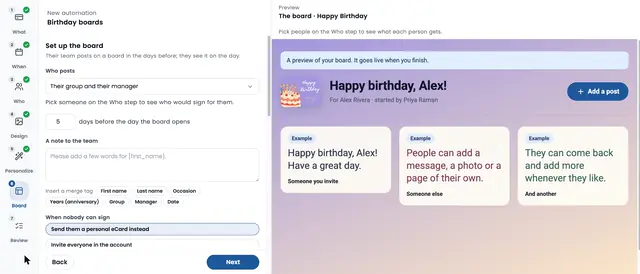
- Birthdays and start dates ride along, and they drive your automations. Set them once and every person gets their card on the day.
You choose how far the feed goes: keep the Directory fully in sync, add and update only, or add new people only.
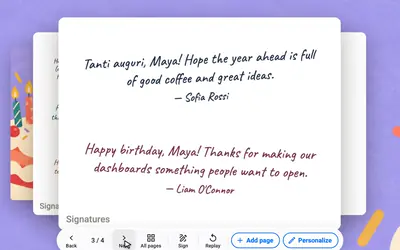
The birthdays in your HR file become birthday cards that send themselves.
Built-in safeguards
A bad export can't empty your Directory
HR exports go wrong sometimes. A filter gets changed, a report comes through half empty. The feed is built so that doesn't turn into missed birthdays.
Stops and asks
If a file would switch off an unusual share of the team at once, the import pauses and waits for you to approve it.
Tells you when it's quiet
You get an email if an import fails or if the file stops arriving, so a broken schedule in your HR system doesn't go unnoticed.
Every run logged
See what each run added, updated and deactivated, so HR can answer "why didn't she get a card?" in a minute.
Drop-only access
Your HR system can deliver files but can't download anything back out, and you can limit the drop to your vendor's IP addresses.
Supported HR systems
Setup guides for the HR system you already run
Each guide covers how that system delivers the report. Using something else? Anything that can deliver a report by SFTP works.
Scheduled SFTP delivery


Delivery set up by the vendor's support team
Upload the export


Any HR system that can't schedule SFTP delivery can upload the same export on the HR System Feed page, and the same import runs. Ask us about yours
What the feed turns into
Recognition that keeps up with your headcount
The feed keeps the Directory right. Your automations do the rest, in each person's own time zone.
Work anniversaries from the hire date
The hire date in your HR file becomes the anniversary card, with their years of service in the message. On Enterprise, the card can carry a gift card too.
Group Cards the right team signs
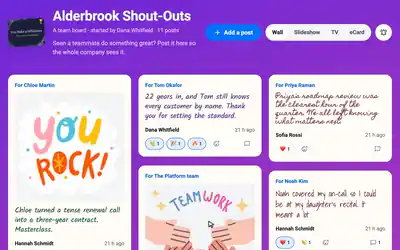
Managers and departments come across from HR, so a birthday or anniversary Group Card invites the people who work with them. The card goes out on the day.
Other ways in
HR System Feed, SCIM or a spreadsheet
| Method | Source of truth | Best for |
|---|---|---|
| HR System Feed | Your HR system, by SFTP | Enterprise teams whose HR system holds the birthdays and hire dates |
| SCIM 2.0 | Your identity provider (Okta, Entra ID, Google) | Enterprise teams that already provision apps from their IdP |
| Directory Sync API or Zapier | Any system your developers or Zaps can reach | Custom workflows |
| CSV import | A spreadsheet | Getting started, on every plan |
The feed and SCIM work on their own or together. Single sign-on for admins is covered on the SSO and SCIM page.
Questions
HRIS integration, answered
Do we need SSO or SCIM to use the HR System Feed?
No. The feed works on its own. Your HR system delivers the employee report and the Directory updates, with no identity provider involved. If you run SCIM too, both keep the same Directory current.
Is there an app to install in our HR system?
No. eCardWidget reads the employee report your HR system already produces. Once delivery is scheduled, it runs without anyone on your team touching it.
What happens when someone leaves?
When a person drops off the report, eCardWidget deactivates them instead of deleting them. Automations stop sending to them and their card history stays. If a file would switch off an unusual share of the team at once, the import stops and waits for you.
Our HR system isn't listed. Can we still use it?
Yes, if it can deliver a report by SFTP. Pick "Another HR system" during setup. If it can't schedule delivery, export the report and upload it on the HR System Feed page; the same import runs.
Do new hires get a welcome card?
Yes, through a Welcome automation. The hire date that comes across in the feed sets when the card goes out, so each new hire is welcomed without anyone adding them by hand. New hire welcome eCards
Which plan includes the HR System Feed?
The Enterprise plan. CSV import of your team works on every plan, so you can start with a spreadsheet and switch to the feed later. Book a demo to see it with your HR system.
Let HR's own data run your recognition
Connect your HR system once. Every new hire gets celebrated, every leaver drops off, and nobody keeps a second list.