









Microsoft Teams + eCardWidget
Every eCard your team sends, posted to a Teams channel, and Group Card links the team signs from chat.
Everything you need to send branded eCards from Microsoft Teams
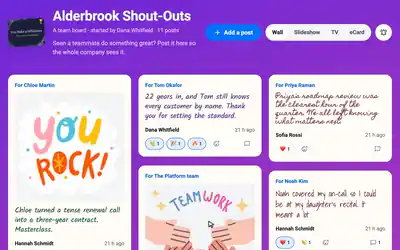
A recognition channel
Each time an eCard is sent, Zapier can post a note to a Teams channel naming who was thanked and by whom.
Share links in chat
Send an eCard as a share link and post it to a channel or chat.
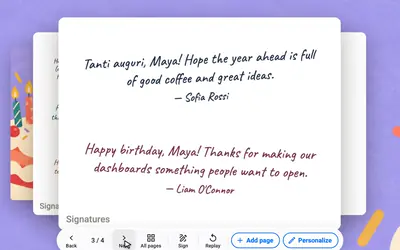
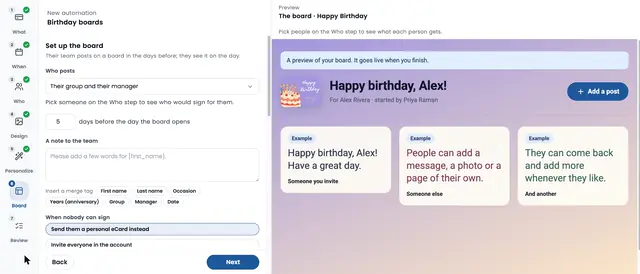
Group Cards, signed from Teams
Paste a Group Card link in a chat and the team signs, no account needed.
Pair Microsoft Teams with eCardWidget
Most of your people check Teams before email. Post eCard sends to a recognition channel so thanks gets seen, and share Group Card and Group Board links in chat so everyone can sign and post from where they work.
A work anniversary eCard goes out from the automation. Zapier posts a note to the #recognition channel in Teams, and coworkers react and reply. For a retirement, HR shares a Group Card link in the department chat.
How to integrate Microsoft Teams and eCardWidget
- 1Create an API key in your eCardWidget dashboard (Enterprise plan).
- 2In Zapier, start a Zap with Microsoft Teams and add an eCardWidget step. Paste the key once to connect.
- 3Pick eCardWidget’s New eCard Sent trigger, then the Teams channel message action. Or send a card as a share link and post the link.
- 4Choose the team and channel, and map who sent the card, who got it and the message into the post.
- 5Turn the Zap on. Cards sent through Zapier show up in your eCardWidget reports, with opens per recipient.
Microsoft Teams + eCardWidget questions
Which plan includes the Zapier connection?
Zapier is on the Enterprise plan. Accounts that connected Zapier before November 2026 keep it. If you would rather build the connection yourself, the REST API and webhooks are on every plan.
What can a Zap do in eCardWidget?
Send an eCard (right away, on a date you pick, or as a share link), add or update a person in your Directory, deactivate someone who left, and look a person up. eCardWidget can also start a Zap when an eCard is sent, or when someone is added, updated or deactivated in the Directory.
Is there a Teams app to install?
No. Teams connects through Zapier, and Group Card, Group Board and eCard Form links open from any Teams chat. If you run SharePoint, the eCard Form and a read-only Group Board can sit on an intranet page too.
Related integrations
Browse all Communication integrations →
Slack
Post eCard-sent notifications to Slack, or trigger eCards from Slack messages.

Gmail
Trigger branded eCards from Gmail events, or notify recipients from a Gmail address.

Microsoft Outlook
Outlook and Office 365 events into branded eCard sends via Zapier.

Mailchimp
Log every eCard send to a Mailchimp audience or trigger sends from campaign events.
Get started with Microsoft Teams + eCardWidget
Start free, no credit card required. The REST API, webhooks and the MCP server are on every plan. Zapier and the HR System Feed are on Enterprise.